Variable types
A variable is a typed container that carries data between nodes. One node fills it, the next reads it — and its type tells the platform what kind of value it's allowed to hold.
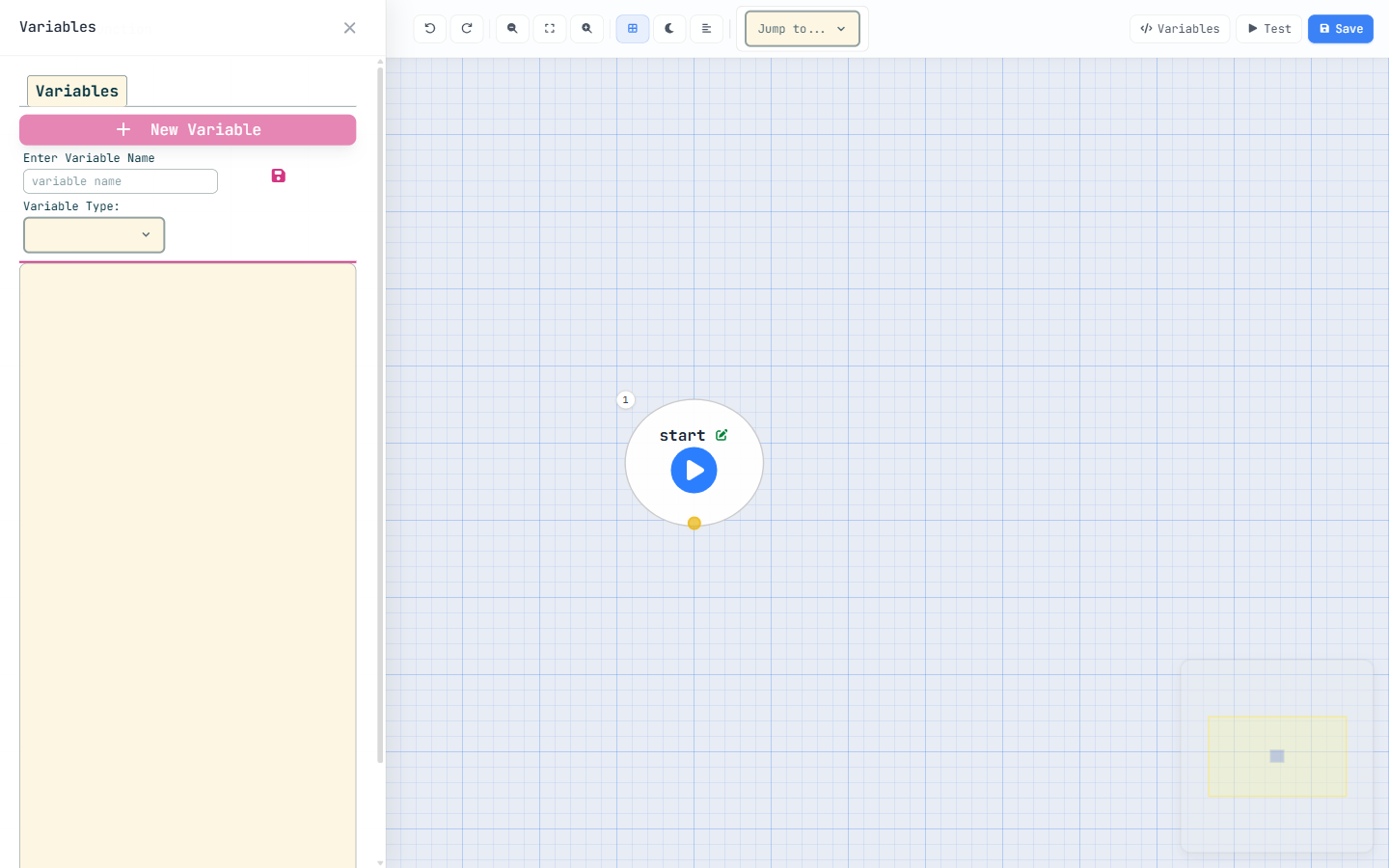
You declare variables in the Variables panel: give each one a name and pick a
type. Getting the type right matters, because a query won't drop a record into a
text box, and a calculation won't run on an object.
The primitive types
- text — any string: a name, a status, an id, a chunk of formatted output.
- number — an integer or decimal. Supports a
defaultValueso it starts at, say,0instead of empty. - boolean — true / false. Also takes a
defaultValue(handy for a flag that should beginfalse). - date — a calendar date (or date-time), the input to formulas like
ADDDAYS. - currency — a money value; like number it accepts a
defaultValue.
The structured types
- object — holds an actual platform record. Because the platform must
know which kind of record, an object variable needs an object API
(e.g.
account__m— your API names may differ). FlipisListon and it holds a list of those records instead of one. - wrapper — a custom data shape you define yourself, for data that doesn't map to any object. It's important enough to get its own unit later in this module.
There isn't a separate "list" type. You take an object (or wrapper)
variable and set isList: true — now it's a list of records (or shapes). One Account
vs. many Accounts is a single checkbox apart.
Three variables appear for free: your input parameters (whatever the call
context hands in), a loop's current item (eachElement, available
inside the loop), and $currentUser (the user the function is running as). Don't
re-declare them — they're always there.
Reading records with Query
The query node is how a function reads data: it loads records from an object and drops them into a variable for the rest of the flow to use.
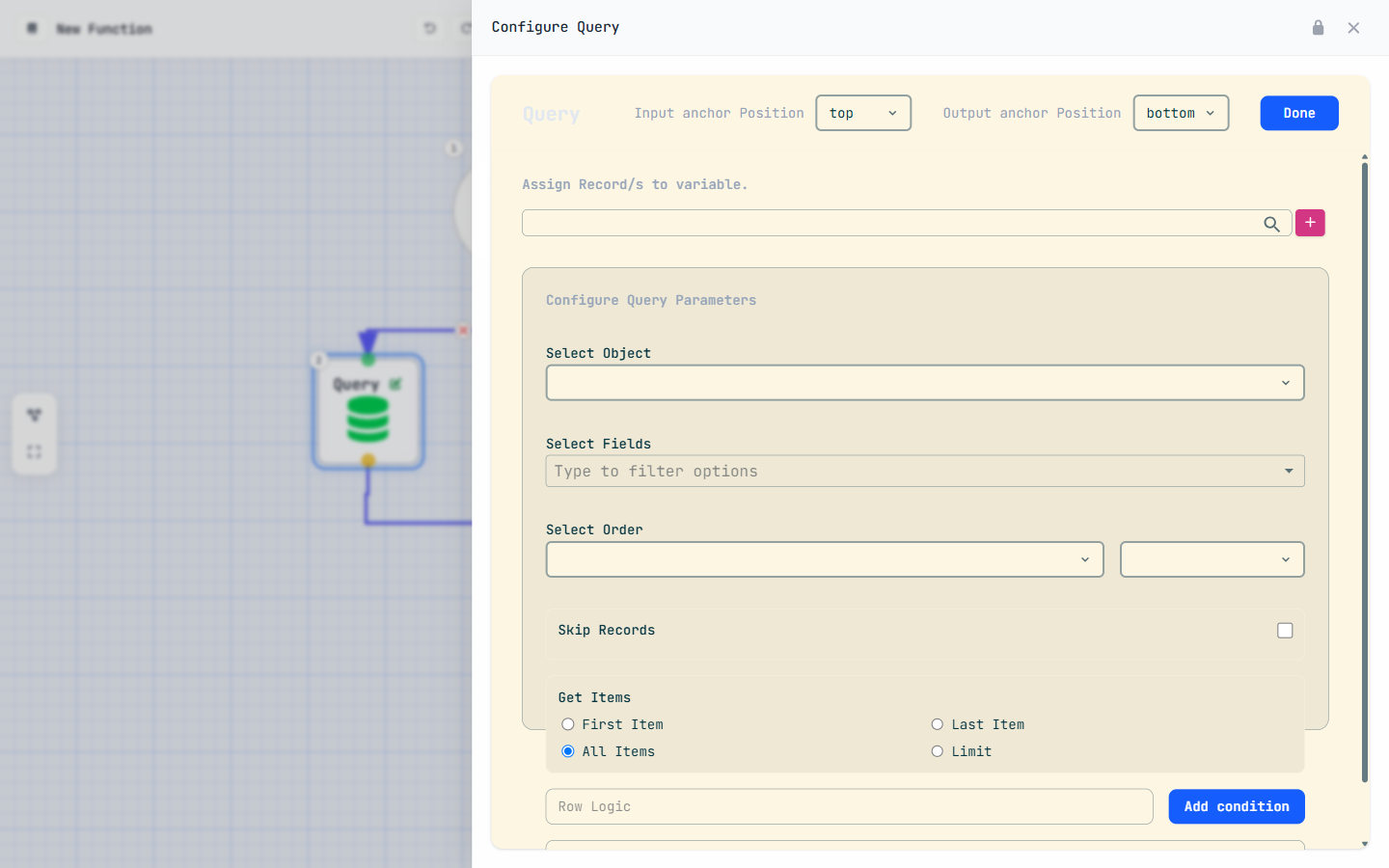
A query is three decisions: which fields to bring back, which records to filter to, and how many you want.
Name the fields — explicitly
There is no wildcard. List every field you intend to read or change:
_id, name, status. This keeps queries fast and makes the
flow's data dependencies obvious. For a lookup field, reach into the related
record with the dotted form — e.g. customer__m._id to pull the linked
record's id (your API names may differ).
Filter with conditions
Each condition has all three parts: a field, an operator, and a value. A condition missing any part is incomplete and must be removed before the function will compile.
How many — the take mode
The take mode decides whether you get a list or a single record — and it must match how you typed the variable:
all— every matching record, as a list (store in a variable withisList: true).index— also a list, but capped: withindex: '5'it returns up to 5 records — it acts as a LIMIT.first/last— a single record (isList: false). Use these when you expect exactly one.
Need a page of results? Combine skip and limit: set enableSkip: true, a
skipCount (how many to skip), then take: index with index
as the page size.
A list take (all / index) needs a list variable; a single take
(first / last) needs a plain object variable. Mismatch them and the
compiler will tell you — but it's quicker to get it right the first time.
For developers — condition operators
Conditions use short operator codes: e Equal, n NotEqual,
i In, ni NotIn, l Less, g Greater,
m LessOrEqual, h GreaterOrEqual, c Contains,
k DoesNotContain, s StartsWith. For In/NotIn
the value is a single comma-separated string with no spaces:
Active,Pending,Draft. And remember — every condition needs all three parts
(field, operator, value) or it must be removed.
Assignment: literal, variable, formula
The assignment node sets a value — and it does so in one of three modes. Picking the right mode is the difference between storing the word "name" and storing someone's actual name.
// 1. LITERAL — the text "Active", exactly as written
value: 'Active'

// 2. VARIABLE — the VALUE of that field/variable
value: 'record.name'

// 3. FORMULA — a calculation (note formula: true)
value:   'count + 1'
formula: true- Literal — stores the text as-is.
value: 'Active'stores the five letters Active. - Variable — resolves a name to its data.
value: 'record.name'stores whatever that record's name happens to be. - Formula — evaluates an expression.
value: 'count + 1'withformula: truestores the result of the calculation.
String literals inside a formula use single quotes:
IF(x > 10, 'High', 'Low'). That's a formula-language rule, separate from how you
type the outer value — mind the difference and your conditions evaluate the way you
read them.
Two toolkits that look alike but never mix. Formulas (IF,
ISBLANK, ROUND, LEN, ADDDAYS…) live
inside an assignment's formula mode. Standard functions
(addToList, sendEmail, concatenate…) are flow nodes you call
from a functionCall node. IF is not a node, and addToList is
not a formula — the Function Reference labels which is which.
Wrappers: custom data shapes
Sometimes your data doesn't map to a platform object — a report row, the JSON from an external API, a computed summary you'll hand back to a page. That's exactly what a wrapper is for: a custom data shape you define yourself.
Where an object variable mirrors a real table, a wrapper is a structure
you invent — a little bundle of fields that exists only while the function runs.
Declaring a wrapper variable
A wrapper variable points at a wrapperName — the shape's definition (its fields).
As with objects, set isList: true when you want a list of that shape rather
than a single one.
Object or wrapper? A quick test
- It's a real record you'll read from or save to a table → use an object (give it the object API).
- It's transient or computed data with no table behind it → use a wrapper (give it a wrapper name).
Say you're building a sales rollup. There's no "Sales Summary" object — the numbers are computed
on the fly. Define a salesSummary wrapper with two fields, region (text)
and total (currency). Loop your Accounts, build one wrapper per region, collect them
in a salesSummary variable with isList: true, and you've got a tidy
result set to return — no table required.
Put it together
Let's tie the pieces into one short flow: read some Accounts and compute a value from them. Four moves — declare, query, declare, assign.
-
Declare a list variable for the records
In the Variables panel add
accountsas an object variable with object APIaccount__m(your API names may differ) andisList: true— it'll hold the list we're about to load. -
Add a Query node
Set its object to Account. List the fields explicitly —
_id,name(add a condition or two if you only want some Accounts). Set the take mode to all and store the result inaccounts. -
Declare a number variable
Add
accountCountas a number withdefaultValue: 0, so it starts clean. -
Set it with an assignment
Add an assignment node targeting
accountCount. In formula mode (formula: true), compute a value from the list —LEN(accounts)for the count, for instance. One node, one computed answer.
We loaded a list but only counted it. To walk each Account, decide something per record, and branch on the result, you need a loop and a condition — that's Module 04 · Control Flow. The variables you just learned are the fuel; control flow is the steering.
Earn the Data Handler stamp
Answer all five to lock in Module 03.